
This article reflects my current strategy for new Google Ads lead generation accounts. I plan to keep refining it as the strategy evolves, and you can see the latest update to this article in the published section above.
If you want help applying this to your business, see Google Ads or start on the contact page .
The goal in a new account
In a new Google Ads account, the first goal is to give Google reliable signals tied to real business outcomes.
The account should be measured by lead quality and lead volume, not impressions and clicks.
In a brand-new account, major conversions are sometimes too sparse at the start. If the account does not have enough signal, Google takes longer to learn. That is where microconversions become useful.
Before launch, I get the basics in place
Before launch, the website, SEO, and tracking foundations need to be aligned.
That means making sure we have:
- a clear offer
- a clear service area
- landing pages or service pages that match search intent
- obvious ways to call, schedule, or leave a message
- conversion tracking installed correctly
- a plan for evaluating lead quality after leads start coming in
It also helps to know what the business already ranks for organically. Local SEO matters here because existing rankings, service pages, and keyword relevance show what Google already associates with the business and can help shape paid targeting.
If these pieces are weak, it becomes harder to tell whether the problem is the ads, the offer, or the website.
I treat the website and the ads as one system
Another advantage is running ads on custom-coded websites .
A custom website gives me more control over speed, page structure, and custom tracking. That makes it easier to remove friction, measure the right actions, and build tracking around the actual lead path instead of settling for a shallow setup.
When those pieces are built together, the account has a better chance of producing profitable results.
How I set up tracking
Major conversions
These are the actions I ultimately want the account to produce most consistently.
Examples include:
- phone calls
- lead form submissions
- booked calls
- other direct contact actions that usually turn into real sales opportunities
Microconversions
These are the smaller actions that help show intent before a major conversion happens.
In Google Ads, some of these microconversions need to be set as primary early so Smart Bidding can learn from them, even though I still treat them as support signals rather than the main goal.
Examples from my own setup include actions like:
- clicking to schedule a call
- loading a booking widget
- starting a message form
- clicking to leave a message
I am careful about what counts as a microconversion
Microconversions can help an account learn faster, but if they are set up too loosely they can push Google to optimize toward the wrong things.
If Google is fed too many optional actions or low-intent interactions, it can start optimizing toward activity that looks useful in the platform but does not lead to real business.
I only use microconversions that represent required steps on the way to a real lead, not optional actions someone can take without meaningful intent.
For example, if a phone call or form fill usually requires clicking into a booking flow, opening a contact path, or starting a message form first, those actions can make sense as supporting signals. Metrics like time on page, scroll depth, or visits to non-required pages usually do not.
Why I use microconversions with smart bidding
Part of what shaped this approach is that I took Jyll Saskin Gales’ Inside Google Ads course. She worked at Google for 6 years and has helped optimize more than 10,000 Google Ads accounts. Taking her course, reading her articles like Should you use Maximize Conversions or Manual CPC bidding in Google Ads?, and applying those ideas in my own campaigns pushed me away from Manual CPC and Maximize Clicks and toward Smart Bidding instead.
Her course and articles also helped me see that if an account is not generating more than roughly 30 conversions per month, the answer is not to fall back to manual bidding. The better answer is to give Smart Bidding better inputs through carefully chosen microconversions.
Some ad managers believe it is better to optimize only for the final conversion and not use microconversions at all. I understand that argument, and once an account has enough real conversion volume I move more weight there. But in my experience, when an account is not bringing in enough conversions, Google’s AI starts guessing off expensive clicks and weak signals. It still does not know how people respond to your specific offer, pricing, and landing page, so it does not always read those signals well on its own.
These happen more often than major conversions in newer accounts and help Google learn faster, but they get low values so Google does not treat them as more important than real conversions. The values can then be adjusted over time based on lead quality.
Why I use microconversions early
A newer account needs enough meaningful conversion volume for Google to optimize well.
A practical benchmark is more than 51 conversions per month because more conversion data usually helps the algorithm learn faster and optimize more confidently.

Accounts generating more than 51 conversions per month show much stronger ROAS (return on ad spend) than lower-volume accounts. That is why I use microconversions early, then shift more optimization weight toward major conversions as the account becomes more stable.
Source: The impact of PPC bidding strategies.
Why maximizing conversion value matters
The account should learn from lead value, not treat every lead the same. That makes bidding strategies like Maximize Conversion Value and Target ROAS useful once the account has enough quality data.
In the same Optmyzr study of 14,584 Google Ads accounts, those bidding strategies delivered the strongest overall ROAS.
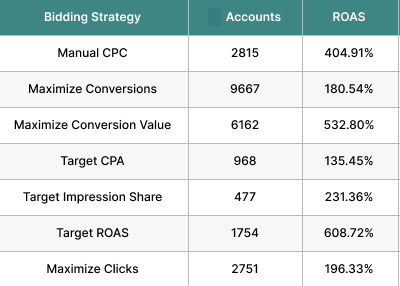
Source: The impact of PPC bidding strategies.
What I do during month 1
1) I review lead quality with you
I work with the business owner to evaluate the quality of calls, messages, and form submissions. If the wrong kinds of leads are coming in, the account needs correction.
2) I adjust microconversion values
As I learn which behaviors correlate better with real leads, I adjust values so the account is learning from better signals.
3) I add negative keywords
One of the most important jobs early on is reviewing search terms and blocking irrelevant traffic.
If the ads are showing for low-intent or wrong-intent queries, I add negative keywords to reduce waste and improve lead quality.
4) I tighten the message and landing page experience
Sometimes the campaign issue is not only keyword quality. Sometimes the page or message needs to be clearer.
Having control over the website helps here. I can improve conversion flow, strengthen calls to action, and remove friction instead of treating the landing page as untouchable.
5) I let Google gather signal and begin optimizing
In the first month, part of the budget goes toward helping the algorithm learn. That is part of building the signal quality needed for better performance later.
Google is usually testing things like:
- headlines
- keywords
- search terms
- time of day
- devices
- audience patterns
- placements, depending on the campaign type
The account is not left alone. Google still needs enough clean data to learn while the campaign keeps getting tightened around lead quality and relevance.
What I do during month 2
1) I evaluate the account for profitability
By month 2, there should be clearer evidence about lead quality, search terms, and whether the account is moving toward profitability.
Questions in month 2 include:
- Are the ads already profitable?
- If not, are they clearly trending in the right direction?
- Are the leads the right kind of leads?
2) I keep adding negative keywords
Search term cleanup does not stop after month 1. I keep blocking low-intent and wrong-intent queries so more of the budget goes toward the searches that are actually producing results.
3) I make minor conversion value adjustments
By month 2, smaller adjustments to conversion values usually make sense so the account starts optimizing more toward the major conversions that matter most to the business and less toward the supporting signals.
What businesses are the best fit for this approach
This approach is a better fit for businesses that:
- have clear services people already search for
- can respond to leads quickly
- are willing to invest in ads
If the business is slow to answer leads, unclear about its offer, or sending traffic to a weak page, Google Ads becomes much harder to make work.
Final thought
Good Google Ads setups align the offer, landing pages, tracking, follow-up process, and optimization strategy so the account can learn from the right signals.
If you want that kind of setup, see Google Ads or start on the contact page .